Who said Autodesk has no sense of humor?
Image courtesy of Jeff Morris, ZGF.
Image courtesy of Jeff Morris, ZGF.

The second Dynamo User Group was hosted at ZGF Architects in downtown Seattle last week. Architects, Landscape Designers, Engineers and Programmers were treated to lunchtime pizza and 3 graphs we have been working on over the past month.
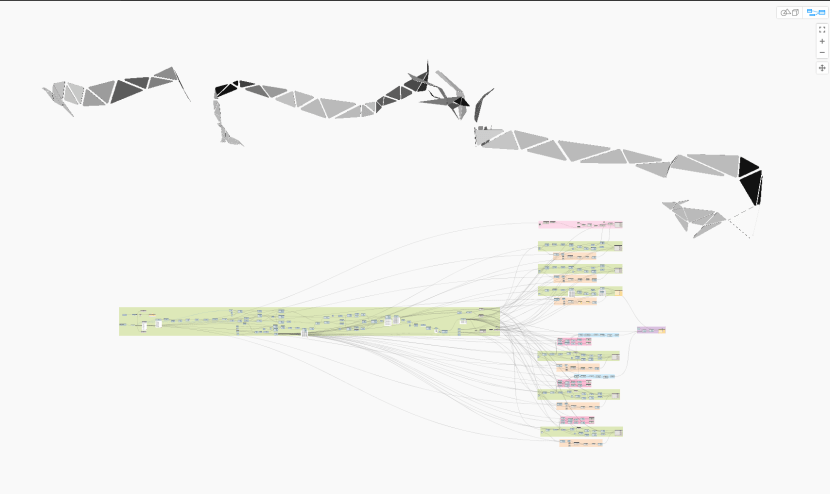
The first Dynamo graph took adaptive panels that were hosted to a mass, read their profiles and redrew them using detail lines within a drafting view. These lines were evenly spaced, sorted, dimensioned and tagged.

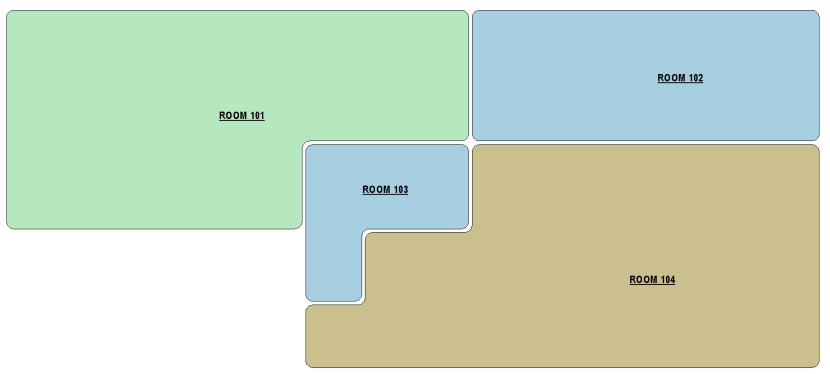
The second graph presented, created room bubble diagrams by taking rooms from Revit and generating region fills with fillets. This automation was requested by a team who previously spent much time exporting plans and manually tracing these outlines in Illustrator. This graph was our first deployment using the Dynamo Player.
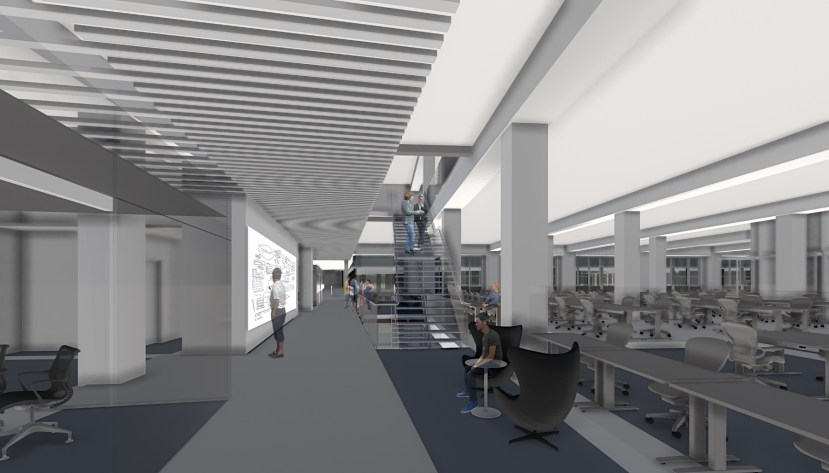
The last and final graph showed how we could read a linked Revit file of 2D furniture and replace with 3D furniture. This workflow was important to a team that needed to have a documentation model of furniture and not be burdened with heavy 3D components; yet at the same time have updated 3D model for rendering and VR purposes.
I cannot upload and share these Dynamo files as WordPress does not support the dyn or zip file types. The Seattle Dynamo has a Slack channel where we troubleshoot and post our graphs and supporting material. If you want to by added to the channel, please let me know. Also, check out the MeetUp site for future Dynamo User Group meetups. Hope to see you there!
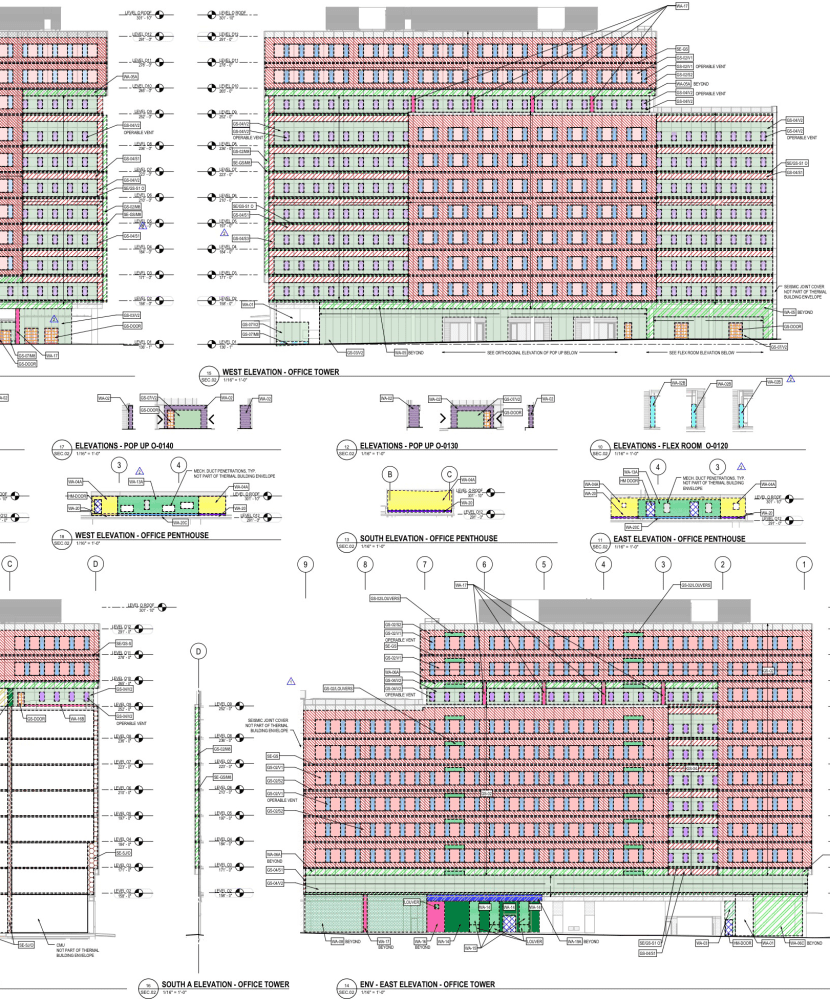
So part of my list of things to do for 2017 was to tackle a better workflow for documenting energy compliance when our designs go to the city for permit review.
The City of Seattle has a 2012 requirement to ensure buildings meet, and hopefully exceed energy performance. As Architects we work with our consultants and team mates to determine the buildings are adequately insulated, properly ventilated, heated, cooled and well lit. There is a little horse trading with design to get the space we want with the appropriate energy performance. After all, you can’t get a naturally well ventilated, day lit space without windows!
The Architect’s job is to show compliance to the Building Energy Code. They do this either by a component or prescriptive method. The component approach is by calculating all the external building envelope areas and multiply them with the U-Value. At the end of the calculation your building needs to be less than the benchmark set by the City. If this is not the case, you are in full building energy simulation and into the prescriptive approach.
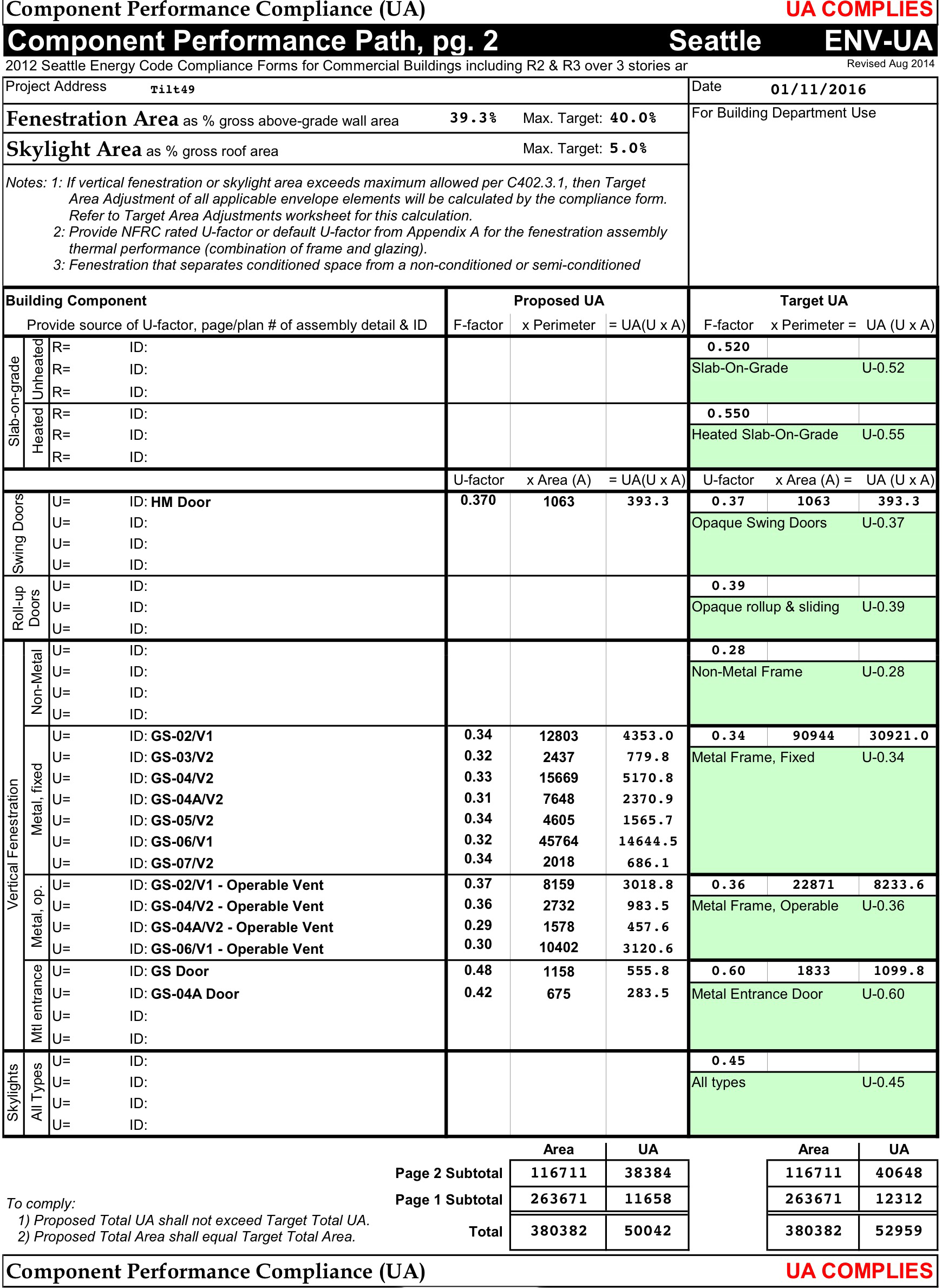
Is it easy to document? The answer is no! Your building is constantly changing through design and the current process of checking compliance is time consuming and works better with a static envelope. Calculations are usually performed at milestones; but wouldn’t it be better if you could get feedback from your model in real time, really informing your design rather than complying?
The documentation in itself is time consuming. As with everything in Revit, there are multiple ways of approaching a task; but what’s the best? There is the laborious process of creating every wall assembly, adding the thermal conductivity and specific heat to all the materials, entering each components thickness to calculate the R and U values. It gets complicated when combining multiple elements into an assembly, such as a glazing and mullions. The advantage with this approach is that when the building changes, so too does the schedule. It does however mean that the team really needs to be integrated and understand what is happening to the assemblies, materials, schedules and model appropriately. A tall order when teams are scrambling to get the work done and members have varying skill sets with the tool. The other approach involves an individual to demarcate areas of building assemblies and assign the appropriate U-value – currently performed in Revit as Region Fills with scheduled material areas.
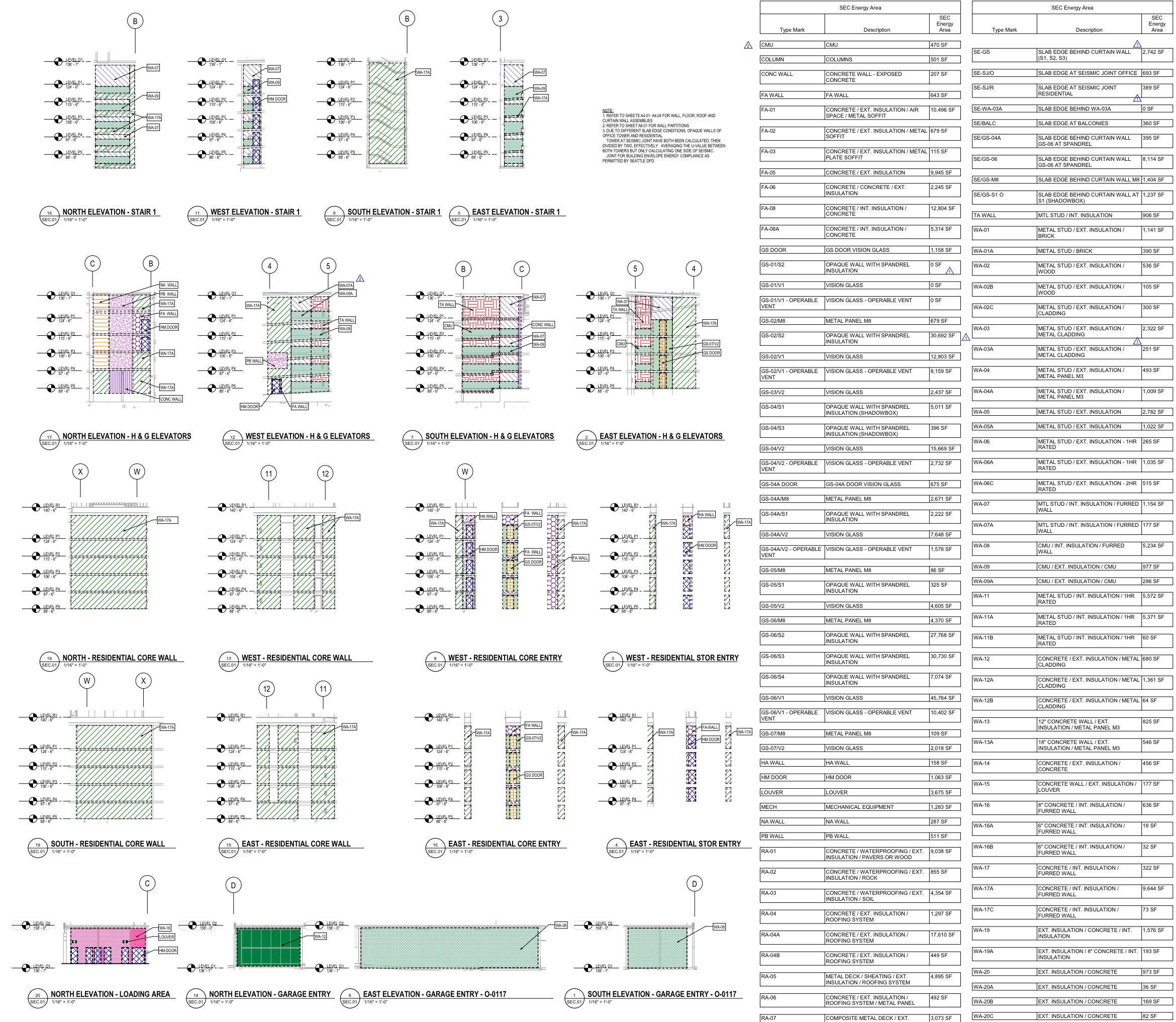
There are some that feel incumbent to create their own unique approach. This week I heard a colleague export elevations to CAD and reinsert these back into Revit within area plans to trace boundaries for the specific assemblies. I applaud the ingenuity, but to rely on a method that requires manually importing/exporting to another format and exhaustively tracing lines does not help in the workflow. Multiple area boundaries also have a tendency to hinder model performance and in turn, grind the laborious process further.
So what are our options? My current idea is to have a mass, split its face and assign the corresponding wall assemblies as painted materials with U-value parameters built-in. If the mass model could smartly update to the building envelope and somehow read the materials from the facade, projecting them onto the mass to schedule, we would be in business. I am hoping we can crack this nut as it will be a huge time saver to our Seattle teams. I believe this will start with massing, journey into Dynamo and probably end with some Rhino and Grasshopper.
If you have any bright ideas, please share as I would love to hear your thoughts. I will continue to post developments, so come back soon to how this project is progressing.

The bane of any architects job is to schedule those doors. Trust me, I’ve been there. Some poor sap has to deal with it, usually the BIM Lead on a project. Why, coz they are the most organized and care about data management. Looking across my colleagues desks at work, you can tell those fastidious employees from the more ‘creative types’. Those that possess the zen are the ones that you want to target for door schedule duty. This duty should not be scoffed at. There is something really nerdy about it: ensuring you get all your parameters organized and your data contained.
For those working on large complex projects, the nightmare of doors accidentally being deleted can make even the seasoned professional nervous. Precautions are instigated: pinning doors and not allowing for re-selection, using BIMLink to record the parameters and push the data back into the model; have back-ups, even checking out a ‘DO NOT DELETE’ Workset. The list goes on. Wouldn’t it be cool if Revit doors maintained their information, much akin to room information remaining in the project? I digress…
Back to our doors… they were like a clipper with barnacles. We needed some deep clean to make the ship run smoothly again. The years had added parameter on parameter and were confusing – who added what and what did they do? Compounded to this was that some of the fields are hard wired to Revit. The ship would certainly flounder in troubled waters with parameters coded incorrectly to either Instance and Type Parameters, such as Fire Rating and Frame Type. Even our families were a challenge for the novice to edit with multiple panels nested into the door family. This caused even further confusion with having only one thumbnail to preview multiple panel types. So it was time for a change, especially during the cathartic time of the beginning of a New Year.
First we compared the parameters we needed scheduled and aligned them to our Shared Parameters. We outlined those parameters that were redundant or could be deprecated. Those that were hardwired we used (except Door Rating which we added a ‘Rating’ instance Project Parameter to the template). We created separated render materials to those materials and finishes that were scheduled as instances.
Rather than alter our existing doors, we decided on rebuilding from scratch using Assa Abloy’s Opening Studio. Their application created great looking doors that did not use much system resources. We named the doors to our convention, tweaked parameters to avoid user confusion using CTC’s Family Processor and ensured the thumbnails looked decent. After a final QA, we uploaded our finished articles to our content management portal at Unifi. A little documentation on our Wiki to which parameter did what, followed by ensuring our template file referenced the appropriate parameter in the schedule, completed our task.
Hopefully our ship sails a little more smoothly and the operator gets to where they need with minimal confusion.

The future? Robots?
The concept of intelligent automation was certainly on Autodesk’s CEO, Carl Bass’ agenda when he ruminated about the driverless car during his AU 2016 keynote speech. Carl noted that we are at the point where BMW’s ‘Ultimate Driving Machine’ will shortly be replaced by the ‘Ultimate Passenger Machine’.

Going to my machine, I ask Google what is the “Ultimate Passenger Machine”. My top hit is autoblog.com showing me the 2010 BMW 550i GT. Admittedly the article is a little out of date, but there’s not a mention of an automated James to ferry us about. Yet the future is pushing for driverless transportation: Uber, Google, MIT, Tesla driving furiously up that road. Even trusty Ford can now park your car and warn of impending hazards. Of course there are the scaremongers that profess it’s not safe, citing the first autopilot fatality with the Model S as proof.
But are you happy with the direction of automation? It does seem inevitable. Elaborate on this paradigm further and you enter the sci-fi world of AI, fantasizing of iRobot, HAL 9000 or Ex Machina. These malevolent portrayals were programmed to learn and survive, eventually turning the tables on those they were programmed to serve. Far fetched?

Not dwelling though on the philosophical or ethical question AI poses, we can see that some form of AI has arrived. Alexa, Cortana and Siri all responding to your requests; the chess game competing and winning against the Grand Master, the Roomba swirling and sucking the dust around your home. More on the latter later.
Mr. Bass sees the progression away from driving the machine to the machine driving us. I tend to disagree. I do not see my two pre-teen boys emulating the passenger. They are the passenger now and all they want is to get behind the wheel. They want to drive. Control the machine. They race their simulations and want to beat the machine, not having it control them.
Back to the Roomba: I wanted one for my home. My first domestic Robot serving its master kinda appealed. I hated our previous vacuum, it sucked! Sorry for the pun. It was time for change and the Roomba captured my imagination. The problem was that I needed a cleaner that didn’t go on a circuit but targeted the area of messiness normally caused by my 6 year old; at the same time, determining what was good to pick up and which Lego pieces to ignore. Unfortunately this kind of intelligent determination the Roomba lacked. It works fine for spacial awareness and sucking, or a vehicle for that joyriding cat, but that’s it. In the end I opted for the cordless Dyson V8 as it gave me the ability for the important, human determined surgical strike.As we are fast approaching an age of machine intelligence, I believe we should focus truly on advantageous and meaningful applications and this couldn’t be more apt for the driverless car – great for getting me home after one too many, finding a parking spot or returning home after taking me to the airport. It does not, however, capture my imagination or inspire – something us humans desire…
And by the way, don’t we have already too many cars on the road?
What do you think? Please comment and let me know your thoughts….

I love this time of year. The time off from work, the promise of snow, the tree, the food, family, the presents… I usually stuff an Apple Gift card in my wife’s stocking and of course, to be self-supporting, one for me. I traditionally go off to their store in search of a quality app. I have been accumulating a few over the years and thought it would be good to share some of my favorites:

Paper by FiftyThree is by far the most seamless Moleskine replacement. I have been complimenting it with their stylus and a Cosmonaut pen. Great way to get concept sketches out and share

I have been going between multiple apps way before palm recognition: Noteability, Penultimate, Notes Plus but what gets my vote is Noteshelf. Don’t get me wrong, they are all competent, but the best behaving, most responsive with my 53 Stylus is Noteshelf. My only gripe is that the pages are too small for my writing. Notability does a great job sharing files, recognizing you palm and combining voice recording, they have even included exporting to social media which is a nice touch. Penultimate I was least impressed with, they have positioned themselves uniquely with Evernote and Jot Script Stylus. Yet if these are your bed fellows, it may convince you to lie with them.
Let’s also not forget the flowing note application of One Note by Microsoft. This iPad application connects to others across platforms. Add images, photos from your camera, write notes and do basic sketching with your pen. A nice feature is shape recognition and stylus support. Totally worth it, especially when it’s free!

Go beyond the sketch and watercolor feel of Paper now place layers and effects to your work. I love the perspective functionality and curve guides of Sketchbook Pro. Procreate is a mature offering and has a nifty time-lapse recording function to showcase your creative skills; Draw feels very responsive and intuitive with some nice UI – hold your pen down in an enclosed region and it automatically fills. All apps allow for PSD export with differing choices to either your Creative Cloud, Dropbox or Autodesk 360 accounts. No clear winner here… love ‘em all.

If flow diagrams are your thing, Grafio is a delightful offering. Simple and easy to use with attractive looking graphics. Only downfall is its limited export functionality with the only options of compressed PNG or JPEG format. Interoperability would be greatly enhanced with scalable vector graphic (SVG) export.
Bez, Inkpad and Graphic are great tools for those seeking Adobe Illustrator on iOS. Depending on what you are willing to spend, Graphic seems to contain the most comprehensive toolset. I find that all provide the necessary tools to produce quality illustrations in an easy and manageable UI. If you are a serious Illustrator, the large iPad Pro and Pencil will be an absolute must.

For anybody who loves atmosphere, puzzles and interactivity… The Room is the best entertainment you can buy… and there are 3 of them! This is a richly immersive environment, from the eerie sounds to interacting with the puzzles to advance you from room to room, this would be amazing in VR. There is even a board game variant out there.

I always wanted to keep within the Bluebeam stable but PDF Expert seemed to do it better. No arrows or clouds here in this offering unfortunately, but free form sketching can be a good substitute. Functionality includes extracting and reordering your pages, adding images and signatures. Improvements would be to include layer management and a copy/paste snapshot tool.

FormIt is the SketchUp for the iPad. Connect to Sketchbook and you have a great architectural visualization workflow. Formit is easy, intuitive and has been designed with the iPad and Pencil in mind. Connect to your A360 and you can work on the desktop App at work. Multiple users can even work in the same Formit Session. Just be warned that your tasks are linear – undo your work, can also undo others!
Shapr3D has recently turned up with Pencil support. I have yet to try it but it looks awesome. This offering seems more for product designers and makers, but the intuitive nature of their demo reel is compelling, although the $99 Pro version may be steep for some. The free version may be enough if you are not looking for high quality STL exports or working with any other CAD / BIM models. As @amsbrstr notes, “This does for Solid modelling on iPad what Solidworks did for Windows. Game changer. Great use of Pencil input as well.”

Writing this Blog, I typically fire up my laptop and type away in Word, storing my document on Dropbox or OneDrive. Word is an industry standard and Microsoft have done good job of opening it onto the mobile market. Connecting to WordPress or sharing to social media is usually a multistep process. Of course you can write directly in the WordPress App and check statistics, however it nice to work offline, collating your thoughts and publish when ready. iA Writer does just that in a focused, clutter free environment. I also found Hanx Writer to be a fun novelty to focusing your writing by listening to click clack of an old type writer, albeit without the usual paper wastage.

We all know of Facetime and Skype, but Slack is a neat perpetual chat platform where you can post comments, images and videos in numerous channels across multiple teams. There is direct messaging and video and voice calls. It works across platforms and devices too, but the best part, it’s free until you hit your 5GB limit.
So that’s my list of favorite iOS apps. I do wish there were more cross-platform functionality to some and that publishers would develop more for Windows tablet devices. That said, mobile apps are fantastic to your workflow and most are affordable, if not free to try. Please share if you have any that are your favorite go-to applications. I am always looking for a good app to tinker with.
Hope you all have a wonderful holiday and that Santa brings the App of your choice!

So having dabbled in Dynamo on an off for the best part of the year, I am in no position to greatly comment on what Dynamo needs. It is a complex animal and seems you need a good bit of Python to tweak what is on offer. There is a good smattering of custom packages out there that can really aid in productivity and open avenues within Revit that were seemly impossible to do.
From newbie with no virtual computational experience, to having created a number of successful graphs either interoperating with Rhino and adaptive components, placing complex railings equidistant over a curved floor perimeter, or generating site plans with Open Street Map data, I am now in a position of understanding, yet having frustrations both at the same time.
It is a great feeling to nerd out and get a graph to function, minimizing the nodes and playing with Dynamo’s logic. It is frustrating to see those little yellow error messages appear without explaining very much, or that the definition seemingly works, only to find out the next time you run it, it inexplicably doesn’t; trying to locate that node to do something simple or that the Revit API isn’t exposing itself.
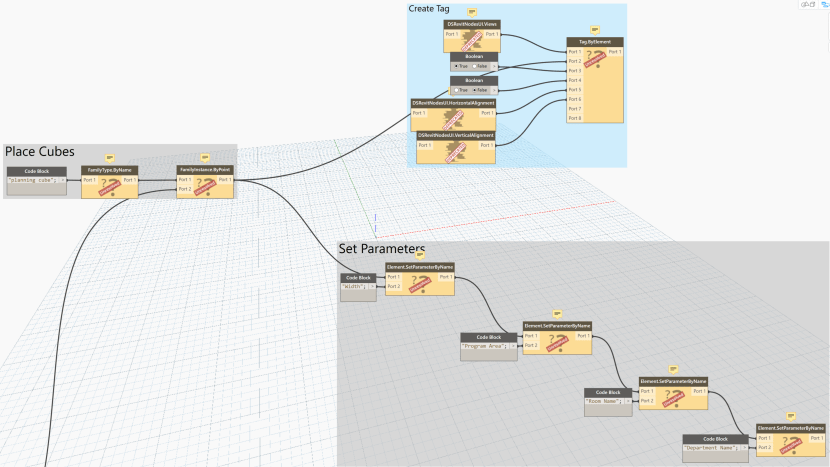
Arghh! Those error message, deprecations and unresolved statuses
My colleague Dane Stokes, a Grasshopper whizz and Rhino jockey, gets easily frustrated with Dynamo. He likens Dynamo to a British car: finicky, powerful but good luck getting it started and seemingly in the shop most days.
The functionality and polish of Grasshopper attract many graduates, who typically aren’t constrained to producing construction documentation. Given a choice, most simply gravitate to Rhino and Grasshopper for their needs, leaving few that can aid with Dynamo in the professional setting.
Dynamo is a great tool to Revit, but best practices, workflows or documentation have not been developed in industry. The standalone Dynamo Studio is being used with FormIt to create geometric shapes and change their properties. Josh Goldstein at Autodesk has provided tools that generate louvers on a building or create a staircase in FormIt. Yet this added functionality provided by Dynamo already exist in the Revit product with parametric families and tools. So when is it appropriate to implement Dynamo with Revit? What are the best workflows if you are pushing data back into Revit in a Work Shared and live model? How can we share and document our custom graphs that we create?
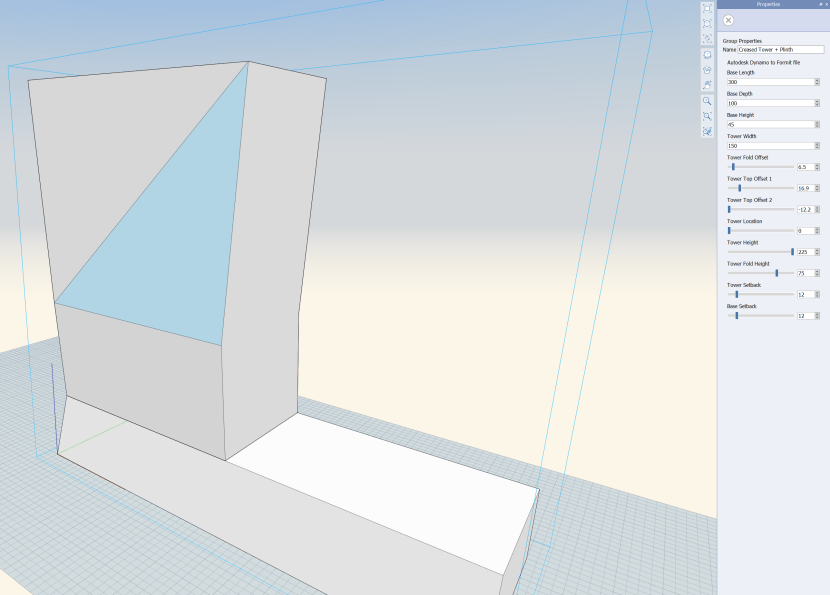
Dynamo Studio Properties in FormIt
Dynamo Player has arrived as of Revit release 2017.1 which helps, but varying inputs need to be incorporated for the Player to function effectively. When we get input functionality, should we create a Dynamo graph or create a dedicated Add-in tool using the Revit API? I feel Dynamo works well for custom situations that require hacking Revit’s stubbornness, yet if there is a repetitive task or a function that is being used consistently on all projects, it is probably wiser to create a tool using the API to share with your entire firm or industry.
I realize that you have read all the way to here and I haven’t addressed what the title of this blog asks, What Dynamo Needs?:
I feel Dynamo would benefit by:
Kudos by the way to the Dynamo team to having done a great job on the Dynamo Dictionary and the new list level functionality. I look forward to future developments. It is fun to get under the hood!
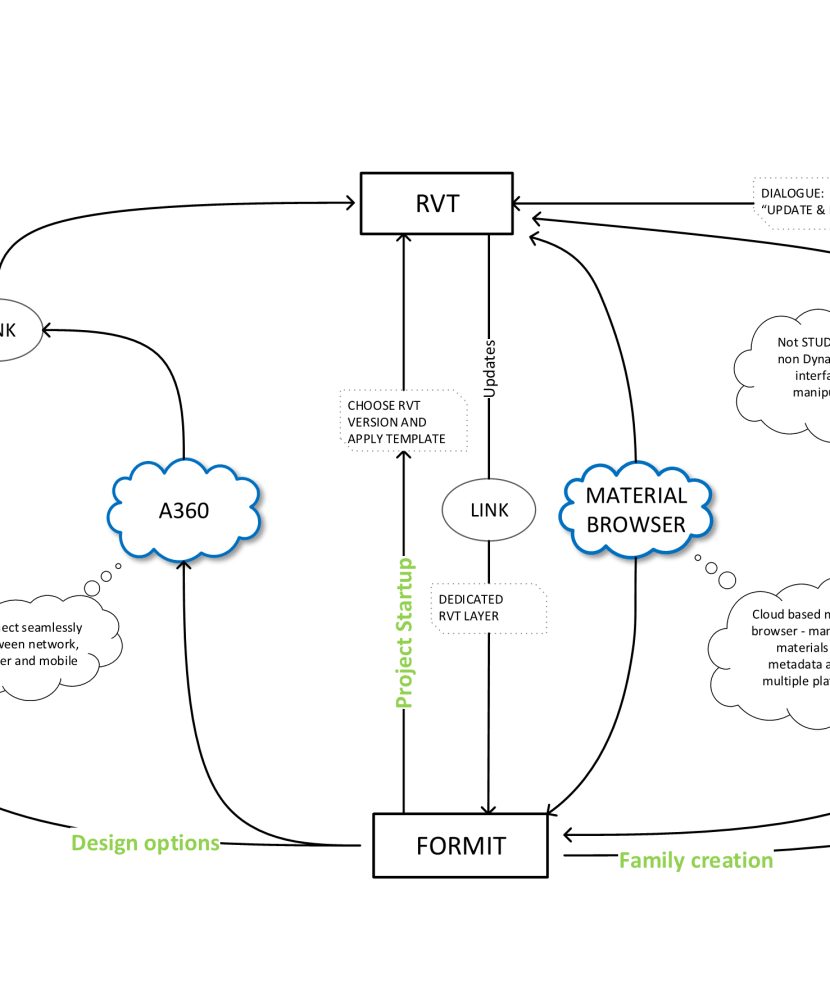
What has informally been dubbed the “SketchUp Killer“, hasn’t quite delivered up to its full potential. Certainly within our office, Trimble SketchUp users that dictate early schematic design workflow have casually rejected the threat.
The ease of modeling that the designers enjoy, frustrates those that are working further downstream. The SketchUp model cannot be used effectively and remodeling efforts undoubtedly occur. This is true the reverse direction, when the updated Revit model is imported back for further iteration within SketchUp. There is no-live linking within SketchUp or sharing of efforts. Even materials do not talk to one another.

SketchUp design model
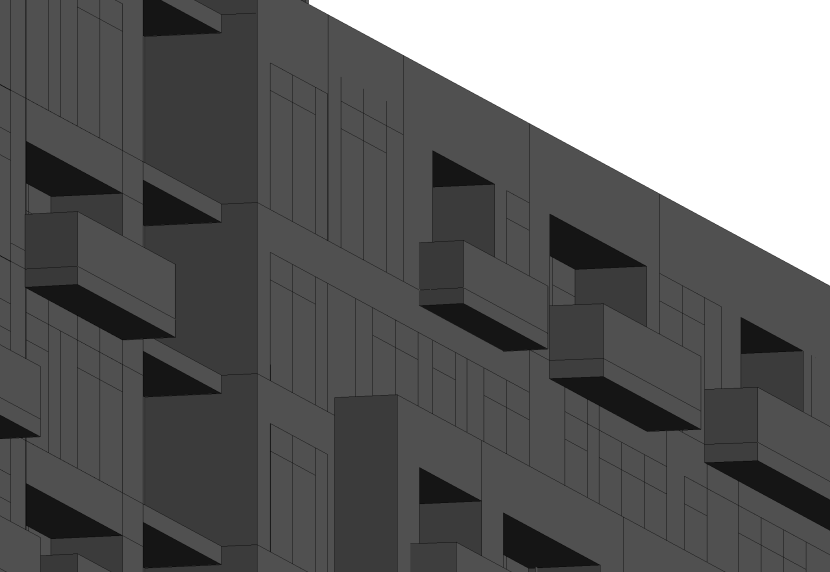
SketchUp model linked into Revit – where did the materials go?
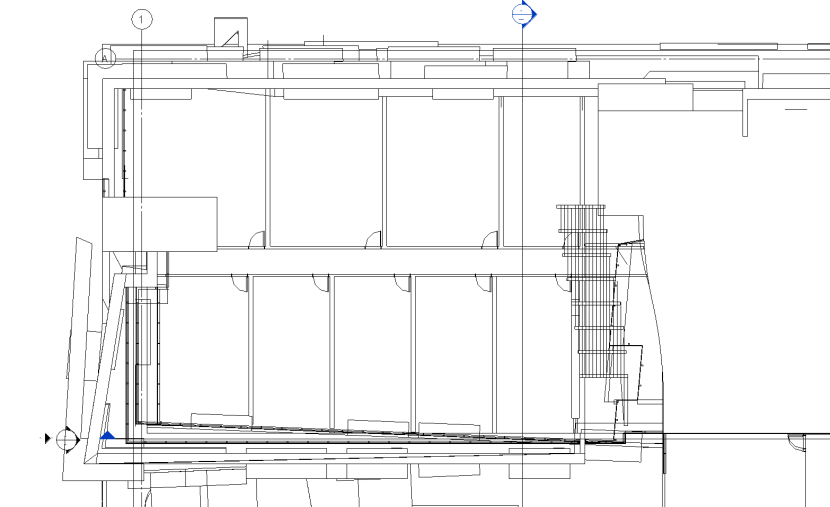
Linked SketchUp model does not cut in plan?
So why is SketchUp still a market force? It has been around a grand old time, over ten years in my career, which in software terms is a lifetime. It has had multiple development cycles and the financial support of Google. What makes is so compelling is the ease of use, even my father of 79 years is a keen user! However things shift and newer kids on the block want in. My 10 year old son every morning fires up Autodesk FormIt on my aging iPad. Tweaks and builds his fantasy baseball stadium at Rat Field. Even his 6 year old younger brother is competing, modelling his police cars and bus stops, although scale can still be somewhat of an issue!
For me, I want an intuitive and efficient workflow that really talks to Revit, our tool for documenting and modelling our designs. It should maintain parametric data and interoperability, not wasting effort in remodeling or sharing assets. If this can be done on a mobile, non complex application that can create forms that make designers happy, we have hit the jackpot. We may not be there yet, but not having to think of file format or be restricted by what the tool can and cannot do, is something we should ask software developers in the AEC industry to produce.
I think FormIt has potential. I really do. It is no Rhino for modeling or SketchUp for intuition and speed, but it does provide a cheaper, nimble, efficient, mobile, analytical, iterative (combined with Dynamo Studio) platform that in someway can inter-operate with Revit. It is relatively young and needs some work to be a mainstream architectural application. For that to occur, FormIt needs to seamlessly work with its mature uncle: linking between one another and sharing the same resources.
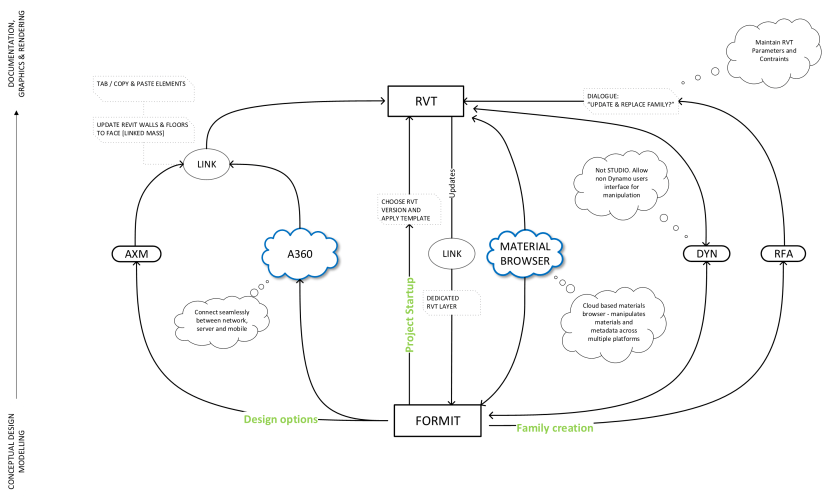
A potential FormIt workflow to Revit?
There are many ways to have multiple teams work Revit. Within the office over a network you work share with your colleagues, all synchronizing your respective local files to a central model. Nothing new here. Your external consultant teams send you their detached central model via FTP and you link these into your central model. Once again, nothing new. If you have colleagues that are not local, you will utilize a Revit Server. What happens though if you are working with external teams remotely and they need to work in your model, such as an architect of record partnering with a design lead architect? You don’t necessarily want the other architect perusing your other projects and files? You also don’t want to pay for their Revit licenses or setup dedicated workstations for them to remote desktop into. Luckily for you there are a few options.
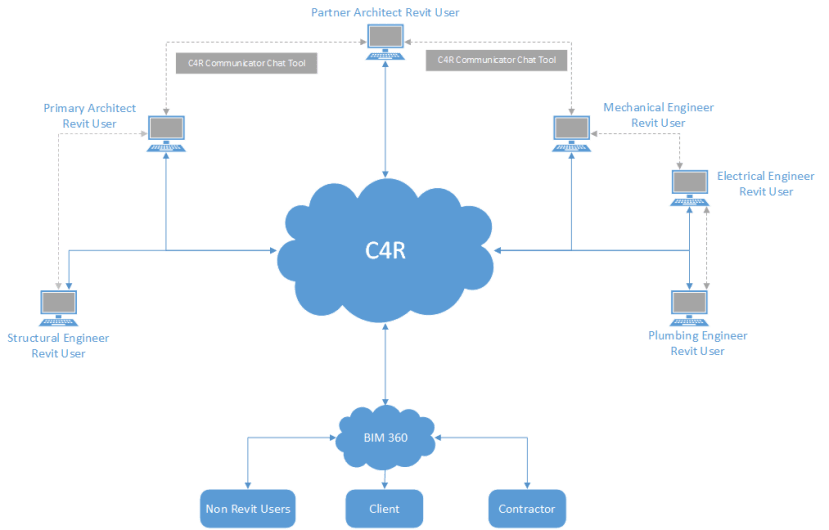
Collaborate for Revit (C4R)
A simple solution is to utilize the “Cloud”. Autodesk have created such a product, linking multiple Revit users to their respective models via their BIM360 integration. Setup is relatively simple and intuitive. Communication is handled via their proprietary chat engine.
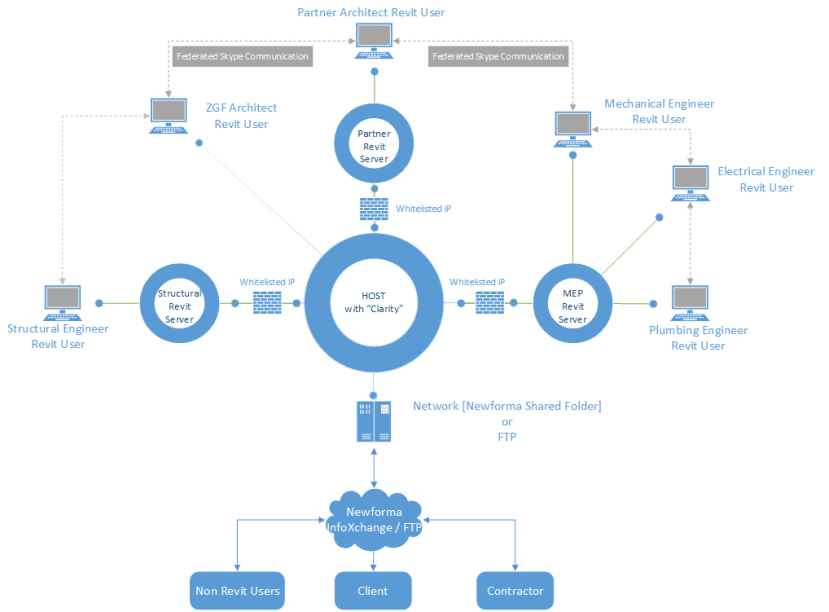
Imaginit Clarity
Hosting in the ‘Cloud’ may not be for everyone. You may even be worried that access at times may be spotty. You may be right!

Wouldn’t it be great to host the all Revit files on your Revit Server restricting user access to other folders? Now you can! Imaginit have done a nice job of overlaying permissions onto your Revit Server using their product they have coined ‘Clarity’. The remote firm can use their Revit Server and sync the files. Setup is a little more complicated as firewalls need to be navigated, IP addresses white listed and users need to be managed. Yet when all is set up, it works great. There is even the bonus of scheduling Revit tasks such as exporting files, printing drawings etc. Want the communication of C4R, federate your Skype for Business and you have a more enhanced experience. The cost is competitive also, with only the host paying for the service, all others need only set up their Revit Server, if they haven’t done so already.
Here is a précis of Revit collaboration methods
Remote Desktop
C4R
Clarity
Need to know partnering firm IP address, Revit Usernames, Autodesk ID’s, email addresses of users.
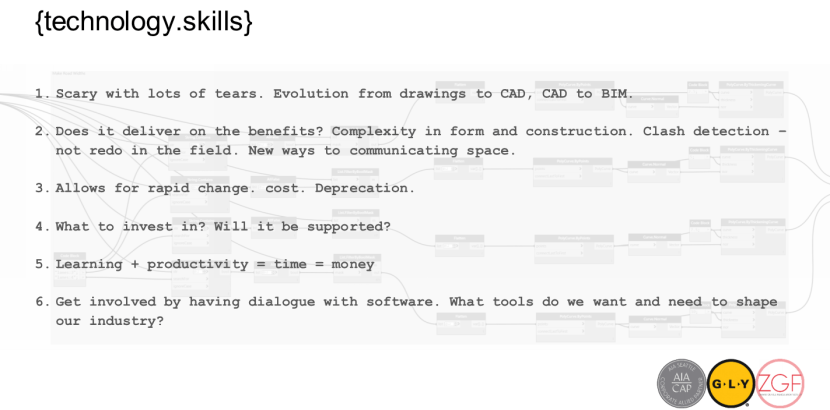
Today I co-presented at the AIA Seattle “Working together in the BIM environment” with Heather Skeehan of GLY Construction. This exercise has inspired me to share both ideas, work and challenges that I am faced within the profession of architecture as a Design Technologist.
I have never been one for a journal, but in the spirit of a new year approaching, I believe it time to pick up my digital pen and reach out to fellow technologist, designers and architects. Let’s see where this goes!
 gly-zgf-aia
